How-to: ChatGPT
Send a PDF for e-signature from ChatGPT
Connect ChatGPT to DocuDetect and ask in plain words: upload this PDF, place the signature and date fields, fill in what I know, send it to my client. ChatGPT does the clicks in your DocuDetect account, shows you each step, and sends only when you say so. It cannot sign or delete anything.
Once
Connect DocuDetect to ChatGPT
About two minutes. You sign in to DocuDetect and approve access once; the connection renews itself while you use it.
- 1
Create a free DocuDetect account
Sign up with email, Google or Discord. Your documents live in this account, and ChatGPT works inside it. - 2
Add DocuDetect to ChatGPT
On the web, go to chatgpt.com/plugins, select the plus button, then Add custom MCP server. Name it DocuDetect, pastehttps://docudetect.com/mcp, set authentication to OAuth and select Create as a plugin. - 3
Sign in and choose what it may do
ChatGPT opens a DocuDetect page. Sign in, then approve read, write and send. Untick write or send if you want to keep changes or sending to yourself. - 4
Turn it on in a chat
In a new chat, open the plus menu and make sure DocuDetect is on. Try: "Using DocuDetect, list my documents."
Every document
From PDF to signature request, step by step
What to ask ChatGPT, and the DocuDetect tool it calls for each step. You can see each tool call in the chat.
- 1
Upload the PDF
Attach the PDF and ask for it. ChatGPT passes the attachment toimport_file, which turns it into a draft in your account. If it cannot, it callsstart_uploadand shows an upload box or a one-time link (valid for 30 minutes), thenfinish_uploadmakes the draft. Example: “Upload this listing agreement to DocuDetect.” - 2
Find the fields
Ask it to place the fields. It runspreparewith thedetectaction, waits for the result withread_documents detection, and shows you the pages withread_documents preview. Nothing is saved until you agree; thenedit_documents save_fieldsstores them. - 3
Fill in what you know
Tell it the facts, such as your name, the property address or the seller of record.edit_documents set_valuesfills them by field. It never fills a signature field, and it leaves price, dates and the signer's own answers blank unless you say otherwise. - 4
Check it and add the signer
read_documents reviewflags fields that look missing or doubled. Give it the signer's name and email;edit_documents set_recipientsaves them.read_documents readysays whether anything still blocks sending. - 5
Send when you say so
It shows you the signer and a summary, and only after you confirm doesemail_document sendemail the signer a private signing link. Your signer signs on any device without an account. - 6
Track, remind and download
Ask who has opened or signed:read_documents getreports it.email_document remindsends a reminder when you ask. When it is signed,read_documents download_completedanddownload_certificategive one-time links to the signed PDF and the certificate of completion.
What it looks like in DocuDetect
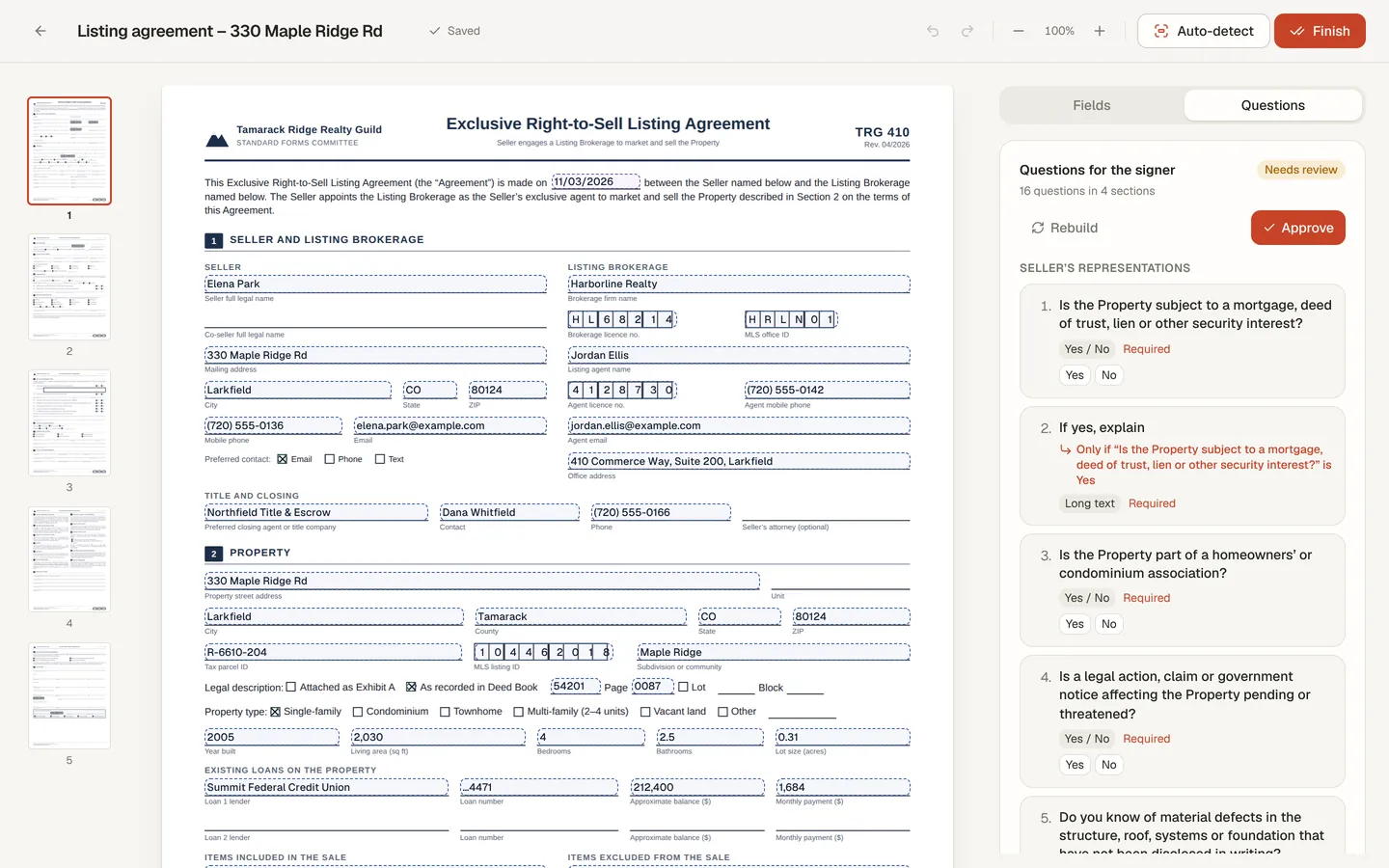
For a long form, ask ChatGPT to build guided questions for your signer. The signer then answers one question per screen and reviews every page before signing. You approve the questions first, in the chat or in the app.
Limits worth knowing
Today it does not
- Sign, delete or send without your go-ahead.
- Handle more than one signer per document.
- Place initials or radio groups (it uses text and checkbox fields instead, and tells you).
- Accept values that look like a Social Security or payment card number from ChatGPT; leave those for the signer.
Questions
Can ChatGPT sign the document for me?
No. There is no tool to sign or delete, on purpose. Your signer signs on the signing page, and you sign your own documents in the DocuDetect app.
How many people can sign one document?
One signer per document. For several signers in order, use Business workflows in the app, or prepare the fields in DocuSign with the DocuSign extension.
Which fields does it support?
Signature, text, date and checkbox fields, up to 500 per document and 20 MB per PDF. Detection reads the first 25 pages. Initials and radio groups are not supported; the assistant tells you when a PDF needs them.
Can it check on my documents every morning?
Yes. Schedule a task in ChatGPT, such as "Every weekday at 8am, use DocuDetect to tell me who hasn't signed yet." It reads read_account signing_digest, which changes nothing, and suggests reminders for you to approve.
What does it cost?
The connector is part of your DocuDetect account, and detection it starts counts against your plan's allowance, the same as in the app. See pricing. Which ChatGPT plans may add a custom connector is decided by OpenAI.