Texas
Texas TREC forms, ready to sign without placing every field
The Texas Real Estate Commission publishes its forms as free PDFs. They are long, with checkboxes, dates and blanks on every page. Upload one to DocuDetect and the fields place themselves; you fill in the deal, check every page and send it.
Step by step
From the TREC website to a signature request
- 1
Download the current form from TREC
Get the PDF from the forms page at trec.texas.gov. Always start from the current version TREC publishes, not an old copy saved on your computer. - 2
Upload it to DocuDetect
Drag the PDF onto a new document, or email it to your account's email-in address. If the PDF already has fillable fields, DocuDetect uses them too. - 3
Let the fields place themselves
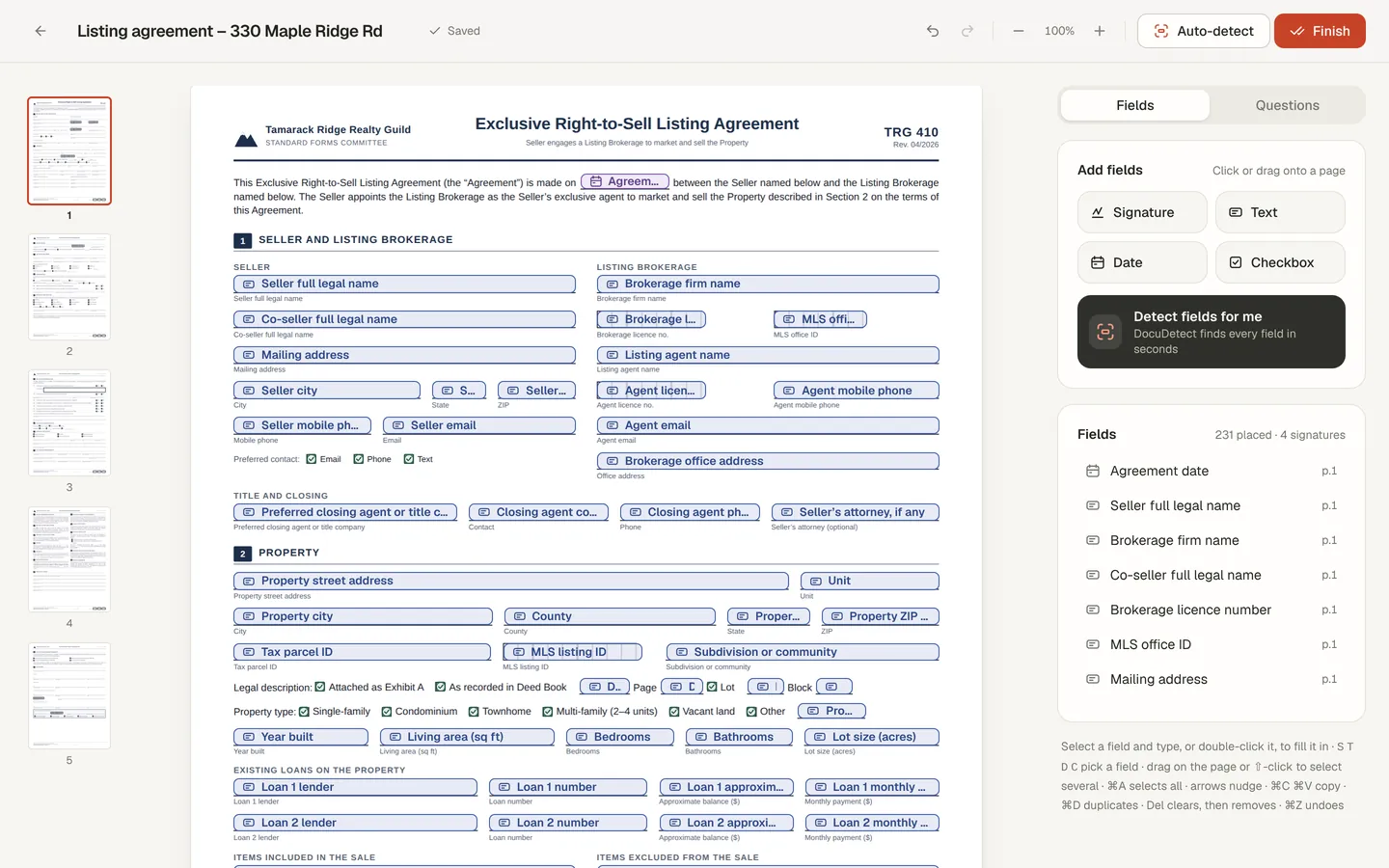
Signature, date, text and checkbox fields go where the form expects them, on every page. A document can hold up to 500 fields. - 4
Fill in the deal
Type the parties, property, price and dates on the page. What you fill in is printed on the PDF and locked for the signer. - 5
Check every page
Detection is a starting point. Look for anything it missed, especially the initials boxes in the page footers, which become text fields. - 6
Send it
Your client signs from a private link on any device. You both get the signed PDF and a certificate of completion by email.
What a long form looks like in DocuDetect
Things to know about TREC forms
TREC requires license holders to use its promulgated forms for most transactions, and it publishes other forms for voluntary use. DocuDetect does not change the form: it adds fields on top of the PDF you upload, and the signed copy is that same PDF with the answers and signatures printed on it.
Use the PDF exactly as TREC publishes it. Whether a form fits a deal, and whether an electronic signature is right for it, is your and your broker's call; DocuDetect is software, not legal advice.
Honest limits for TREC contracts
- One signer per document. A contract that both buyer and seller sign needs one copy per signer, or Business workflows for several signers in order, or DocuSign with the DocuSign extension.
- Initials boxes become text fields; there is no separate initials type and no radio groups.
- No form library: download each form from TREC yourself so you always have the current version.
Questions
Can my seller answer a disclosure as questions instead of the form?
Yes. Guided questions turn the seller's open fields into one question per screen; you approve them first, and the seller reviews every page before signing.
Can I keep a filled-in master for each property?
Ask ChatGPT or Claude, connected to DocuDetect, to copy your master form for each property and fill in what you tell it. See the ChatGPT guide.